unbloat
A terminal tool that gets disk space back from WSL and Docker Desktop on Windows, and says what each step costs before it runs any of them.
- Role
- Design and build
- Client
- Personal project
- Year
- 2026
- Stack
-
- Tool
- Go, Bubble Tea, Lip Gloss
- Windows
- WSL, Optimize-VHD, diskpart, golang.org/x/sys
- Release
- GitHub Actions, GitHub Releases
Clearing 15.2 GB freed nothing on C:
I kept running out of space on C: because of WSL, Windows’ way of running Linux, and Docker Desktop, which runs containers on top of it. Deleting files inside them doesn’t give C: anything back. One time C: was at 98%, and clearing 15.2 GB of caches didn’t move it. Getting the space back by hand is slow and easy to get wrong. It’s a common problem, too: WSL’s issue asking for that space to come back on its own has been open since 2019.
One checklist, every cost written beside it
WSL and Docker Desktop keep everything in virtual disk files on C:, and those files don’t shrink on their own. Space cleared inside one takes 2 more steps to reach C:. A trim marks what’s free, and it has to run from the disk’s own distro, the Linux install that uses it. Compacting then gives that space back to C:, and it means stopping Docker Desktop and shutting WSL down. With the trim in the wrong distro, little comes back: compacting Docker’s disk after a trim in Ubuntu returned 0.9 GB, and 7.6 GB after a trim in its own.
unbloat scans first. The scan changes nothing and doesn’t start a distro that’s
stopped. Then it shows one checklist: npm, npx, pip and pnpm caches inside each
running distro, Docker’s build cache and unused images, old files in %TEMP%
and the package managers’ caches on Windows, and each virtual disk with its
file size and how much of it is in use. Caches start ticked. Images and disks
start unticked, with their cost written beside them, such as closing every WSL
window.
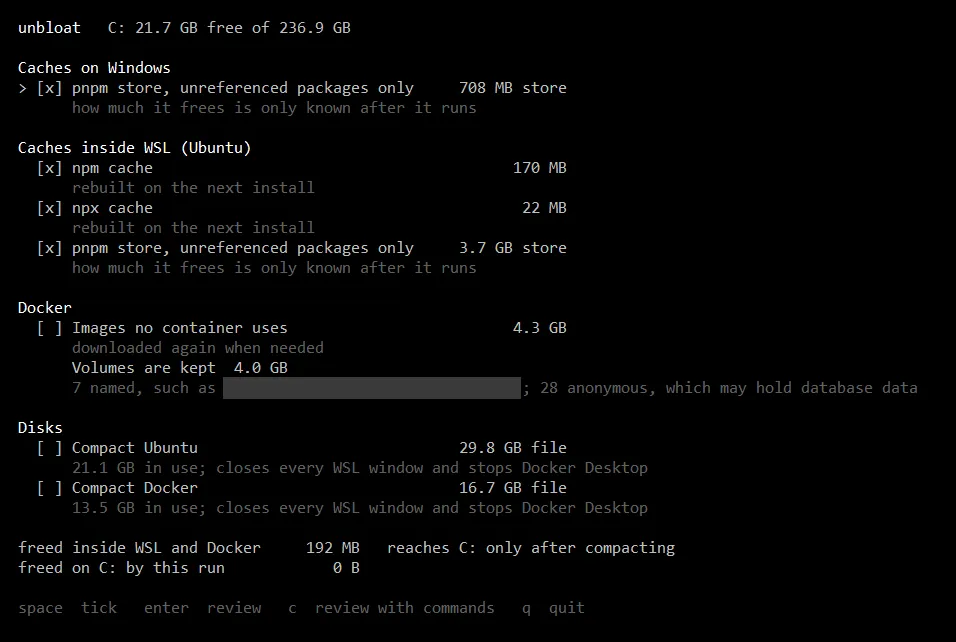
Docker volumes, where containers keep their data, are never offered. A database’s volume can look just like an unused one, and the official Postgres image keeps its data in an anonymous volume unless it’s given a name.
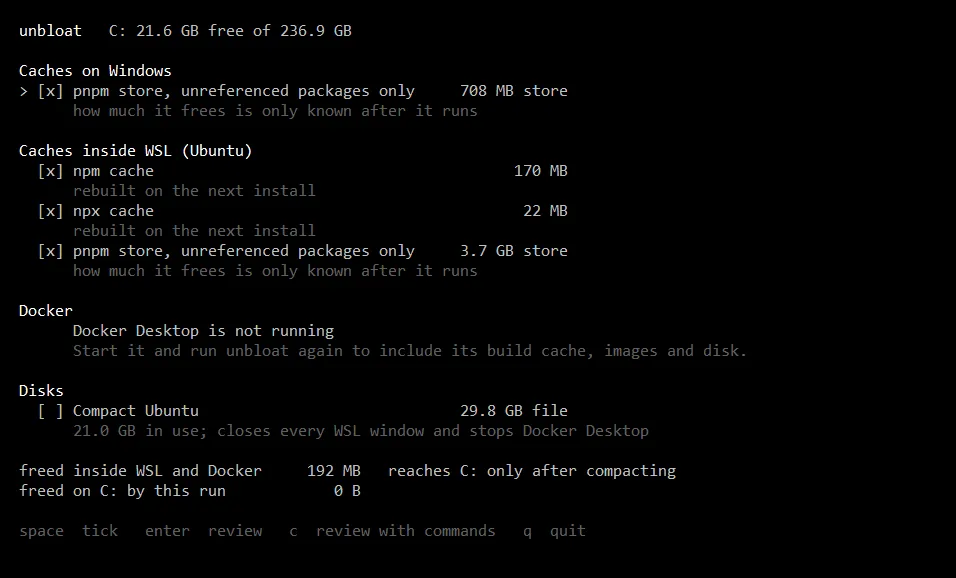
Before it runs, it lists every step in order and can show the exact commands. Every command and its output goes to a log, and the summary says how much each compaction returned.
The same order, whatever gets ticked
One order, whatever gets ticked. Caches first, then Docker’s build cache, then a trim inside each disk’s own distro while everything is still running. Then Docker Desktop stops, WSL shuts down, each disk is checked for anything still holding it, and it’s compacted: with Optimize-VHD where Windows has it, and with diskpart and the disk attached read-only on Windows Home. A disk whose trim failed isn’t compacted, and if no trim worked, nothing shuts down.
Checks before the shutdown. With a disk ticked, the run won’t start if
unbloat was launched from inside WSL, since shutting WSL down would end
unbloat too. It spots that by finding wsl.exe among its own parent
processes. Being on battery below 50% blocks the run as well, and an unknown
power state counts as battery. If Docker Desktop won’t stop, WSL is left
running.
Ctrl+C stops the run before its next step. A step that has already started finishes. Every command also runs in its own hidden console, so an interrupt in unbloat’s window never reaches a diskpart that’s partway through a compaction.
One runner for every command. Every command goes through it, so the tests
replay output recorded on a real machine: wsl.exe listings in
UTF-16, the WSL registry read as JSON, docker system df and df. CI runs
them on Linux and Windows and builds executables for amd64 and arm64, and a
tag publishes both with checksums. GitHub’s Windows runners can’t run WSL 2,
so the full run was checked by hand on a real machine.